Platform Capabilities (Local)
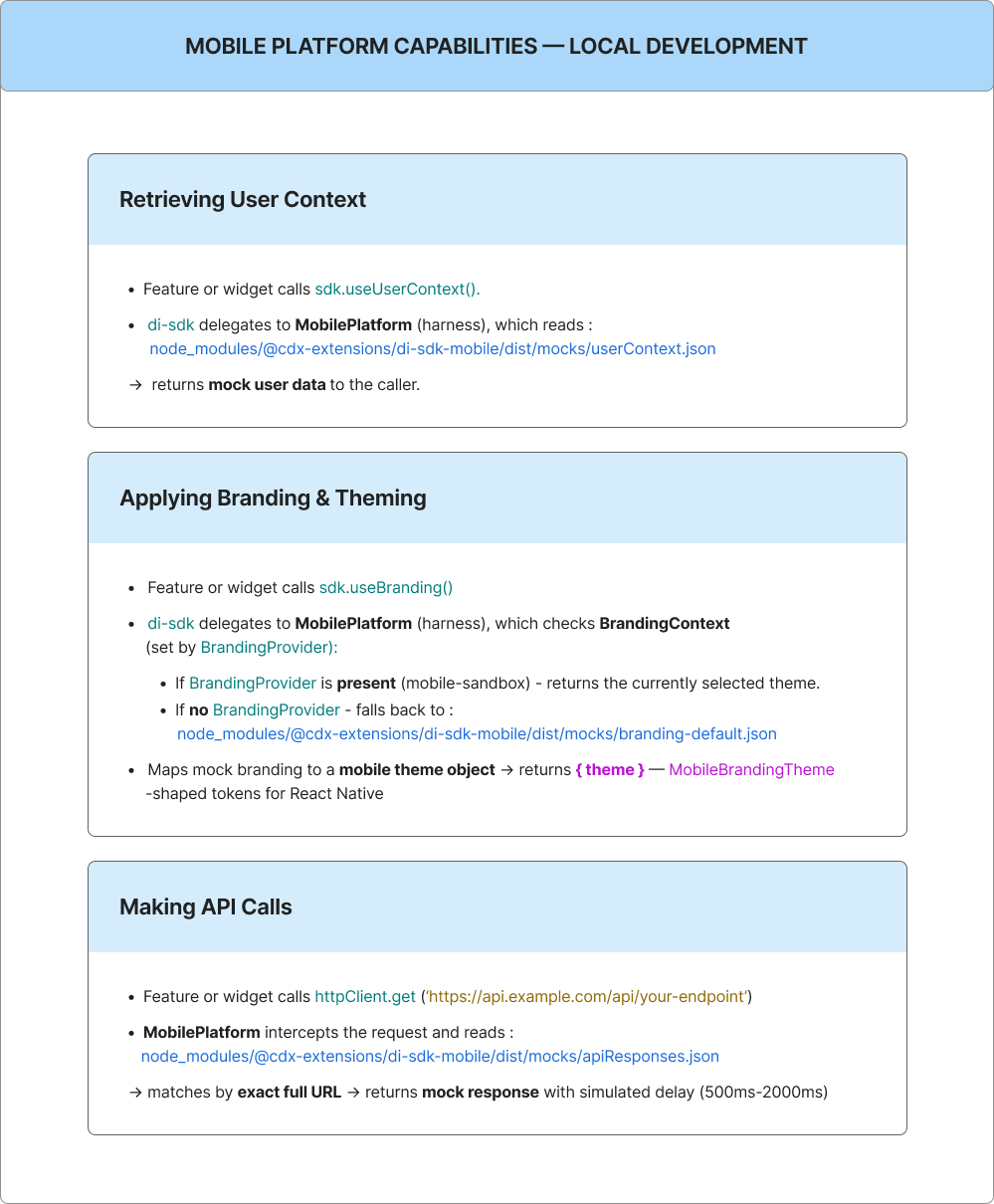
When running the mobile sandbox (playground/mobile-sandbox) locally, there is no real mobile banking platform. The mobile harness (@cdx-extensions/di-sdk-mobile) provides all platform capabilities through mock data and simulated behaviour.
For prerequisites, setup, and local development commands, see the CDX Extensibility Apps README.
Here is exactly what each capability maps to:
Mock Data Files
| File | Purpose |
|---|---|
node_modules/@cdx-extensions/di-sdk-mobile/dist/mocks/userContext.json | Mock logged-in user returned by useUserContext() |
node_modules/@cdx-extensions/di-sdk-mobile/dist/mocks/apiResponses.json | All mock API endpoint responses used by getHttpClient() |
node_modules/@cdx-extensions/di-sdk-mobile/dist/mocks/branding-default.json | Default branding/theme data (when BrandingProvider is not available) |
node_modules/@cdx-extensions/di-sdk-mobile/dist/mocks/branding-classic-blue.json | Classic Blue branding variant |
node_modules/@cdx-extensions/di-sdk-mobile/dist/mocks/branding-purple-elegance.json | Purple Elegance branding variant |
node_modules/@cdx-extensions/di-sdk-mobile/dist/mocks/branding-ocean-blue.json | Ocean Blue branding variant |
node_modules/@cdx-extensions/di-sdk-mobile/dist/mocks/branding-forest-green.json | Forest Green branding variant |
node_modules/@cdx-extensions/di-sdk-mobile/dist/mocks/branding-crimson-red.json | Crimson Red branding variant |
These files are inside node_modules so they will be reset on pnpm install (or pnpm run setup).
Sample Mock User Context (userContext.json)
{
  "institutionUserId": "1BC594E59CBB0846E063C0A011AC7A12",
  "userName": "jdoe",
  "lastName": "Doe",
  "firstName": "Jane",
  "fullName": "Jane Doe",
  "guid": "25c6b6950f0c481ab036d3e3039cab31",
  "email": "jane.doe@example.com",
  "institutionUserRole": "PRIMARY",
  "institutionUserType": "RETAIL",
  "institutionId": "00516"
}
Modify this file to simulate different users (e.g. admin role, different institution) during local development.
Please use the fields shown above. Additional fields are currently unsupported.
Branding on Mobile
Mobile widgets use sdk.useBranding() for colors, typography, and component-oriented tokens. They stay visually consistent with the institution's branding on the mobile banking host.
How it Differs from Web
On web, useBranding() returns an MUI theme object that you pass to ThemeProvider, and global theming on the Online Banking application can override widget-level styling.
On mobile, the same SDK method returns a MobileBrandingTheme-shaped object intended for React Native. Map those tokens to StyleSheet values, themed primitives, or your own design-system components. Do not use MUI or CSS theme objects.
Local Development
When you run playground/mobile-sandbox locally, the mobile harness (@cdx-extensions/di-sdk-mobile) supplies branding from mock data under node_modules/@cdx-extensions/di-sdk-mobile/dist/mocks/.
Treat theme as possibly incomplete during local development. Always provide local fallback values, so your widget remains usable before every token is populated by the harness or host.
Switching Brandings in the Sandbox
The sandbox app wraps all screens in a BrandingProvider (from @cdx-extensions/di-sdk-mobile) that enables live branding switching during development. Tap the ⚙ gear icon in the navigation header to open the theme picker and select from:
| Branding ID | Name |
|---|---|
branding-classic-blue | Classic Blue |
branding-purple-elegance | Purple Elegance |
branding-ocean-blue | Ocean Blue |
branding-forest-green | Forest Green |
branding-crimson-red | Crimson Red |
Your widget receives the selected theme automatically through sdk.useBranding() (no code changes are needed). Use this to verify that your UI renders correctly under different brandings.
The branding-default.json mock is used as a static fallback (when no BrandingProvider is present). It does not appear in the settings switcher.
Production
On the mobile banking host, the institution's live branding injects at runtime. Your code remains unchanged; only the theme data source changes. Hardcoding colors and typography should not be the sole source of truth when SDK theming is available.
For the method signature, parameters, return types, and code examples, see SDK Reference.
Local Development Setup
Before you start: Complete the prerequisites and environment setup described in the CDX Extensibility Apps README.
Setup
git clone https://github.com/candescent-dev/cdx-extensibility-apps.git && cd cdx-extensibility-apps
corepack enable
corepack prepare pnpm@9.15.9 --activate
pnpm run setup
If corepack enable fails with EACCES or EPERM, see Corepack permission denied.
Build
pnpm exec nx run investment-portfolio:build
Start from the Mobile Sandbox
pnpm exec nx start mobile-sandbox
This runs Expo inside playground/mobile-sandbox/. Scan the QR code with Expo Go (Android) or press i for the iOS Simulator. After generating a new widget or feature, run pnpm run sync:mobile (do not run pnpm run ci:mobile).
Build Targets
Each mobile widget defines three Nx targets:
| Target | Command | Description |
|---|---|---|
build | pnpm exec nx run <name>:build | Production build with tsup (CJS + ESM + .d.ts) |
dev | pnpm exec nx run <name>:dev | Watch mode for development |
typecheck | pnpm exec nx run <name>:typecheck | TypeScript type checking (no emit) |
Next Steps
- Extension Template Catalog — Scaffold from DI template catalog
- Host App Integration — Repository structure and submission process
- FAQ & Troubleshooting — Common issues and recommendations
- Features — Platform Capabilities — Local platform capabilities for full-screen features